
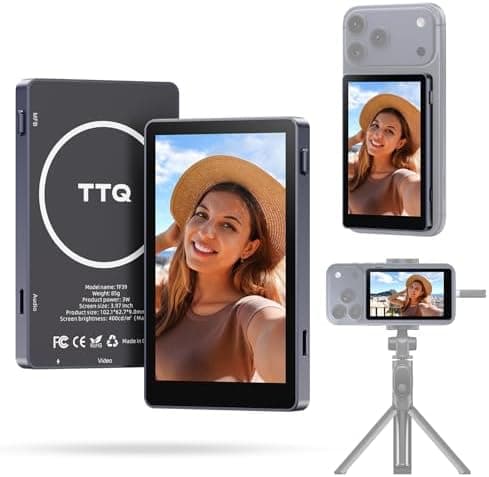
TTQ 4K 60fps Vlog Selfie Monitor Screen, Magnetic Phone Vlog Selfie Monitor
TTQ • Accessories
- Free shipping · Ships in 2-3 business days
- Free in-store pickup available
Technical Specs
Description
4K Clarity & Magnetic Ease: Enjoy plug-and-play 4K@60fps recording with real-time audio (Android requires OTG/DisplayPort support). The powerful N52 magnet snaps securely onto iPhone 15/16/17 (magnetic sheet included for other phones). MONITOR IS SELF-POWERED BY YOUR PHONE-NO BATTERY OR SWITCH. Phone vlog selfie monitor screen is perfect for home/office/on-the-go use. Sunlight-Readable Screen & Smart Control: A large, vibrant 400-lumen screen stays clear even outdoors. Back camera selfie monitor included Bluetooth remote (33ft range) lets you frame shots and start/stop recording effortlessly from a distance. Frame shots perfectly without arm strain-ideal for solo creators filming tutorials, interviews, or group content. All-Day Power & Perfect Angles: Phone monitor screen builts in USB-C pass-through port can connect with phone charger and charges your phone during long streams. A one-touch 180° rotation button instantly corrects the image orientation, preventing upside-down footage. Uninterrupted Audio & Full Compatibility: Record high-quality video without losing any phone audio functions-take calls or play music seamlessly. COMPATIBLE MODELS: iPhone 15, 16, 17 series and above (iPhone 16E/17E/Air not supported); Samsung Galaxy S21, 23, 24, 25 series, Z Fold 5, Note 20, etc; Google Pixel 8, 9 series; OnePlus 9, 10, 12 series; Motorola Edge, Edge+ series. For more supported models, please contact our technical support. Reliable Wired Connection: Experience zero-lag video transmission and stable audio sync through the direct wired connection, phone vlog selfie monitor screen is ideal for professional vlogs, live streams, and TikTok creation. Key Setup Notes: 1). Landscape Mode Solution - Lock screen orientation to Portrait mode before launching camera. Horizontally rotate phone for correct landscape display. 2). Samsung DeX Not Supported - Our product only provides screen mirroring for rear-camera viewing, make sure DeX is turned off when mirroring screen.
Check the full terms at /policies